A small bedroom has a lot of jobs. It’s where you sleep, where you get dressed, maybe where you work during the day, and then, at nine in the evening, it’s where you want to sit down for three hours of gaming. Most rooms like this end up with a desk squeezed against whatever wall was left, a tangle of cables behind it, a chair that blocks the closet, and a monitor glowing next to the pillow.
It doesn’t have to look like that. A good small bedroom gaming setup is less about fitting in more gear and more about planning the corner the way you’d plan a tiny kitchen: every centimeter gets a job, cables disappear, and the lighting switches from “play” to “sleep.” Done well, it can be the coziest corner in the room instead of the messiest one.
These are the gaming setup ideas I’d plan in order, from the floor space up.
Start with the space you actually have
Before buying anything, measure. For a comfortable setup, you need roughly:
- Desk width: 100 cm is enough for one monitor, a keyboard and a mouse. 120–140 cm fits a PC tower on the desk or a second screen.
- Desk depth: 50–60 cm. Shallower than 50 cm puts the monitor too close to your face unless you use a monitor arm.
- Chair space: about 90 cm behind the desk edge so you can pull the chair out and sit down without hitting the bed.
- Walkway: keep at least 60 cm free between the chair and the bed, door or closet.
Then look at where the corner can go. A corner next to a window works well for daylight but can cause glare on the screen. The wall across from the bed is tempting, but that means staring at the setup when you’re trying to sleep. A side wall, or the dead corner next to the door, is often the best spot.
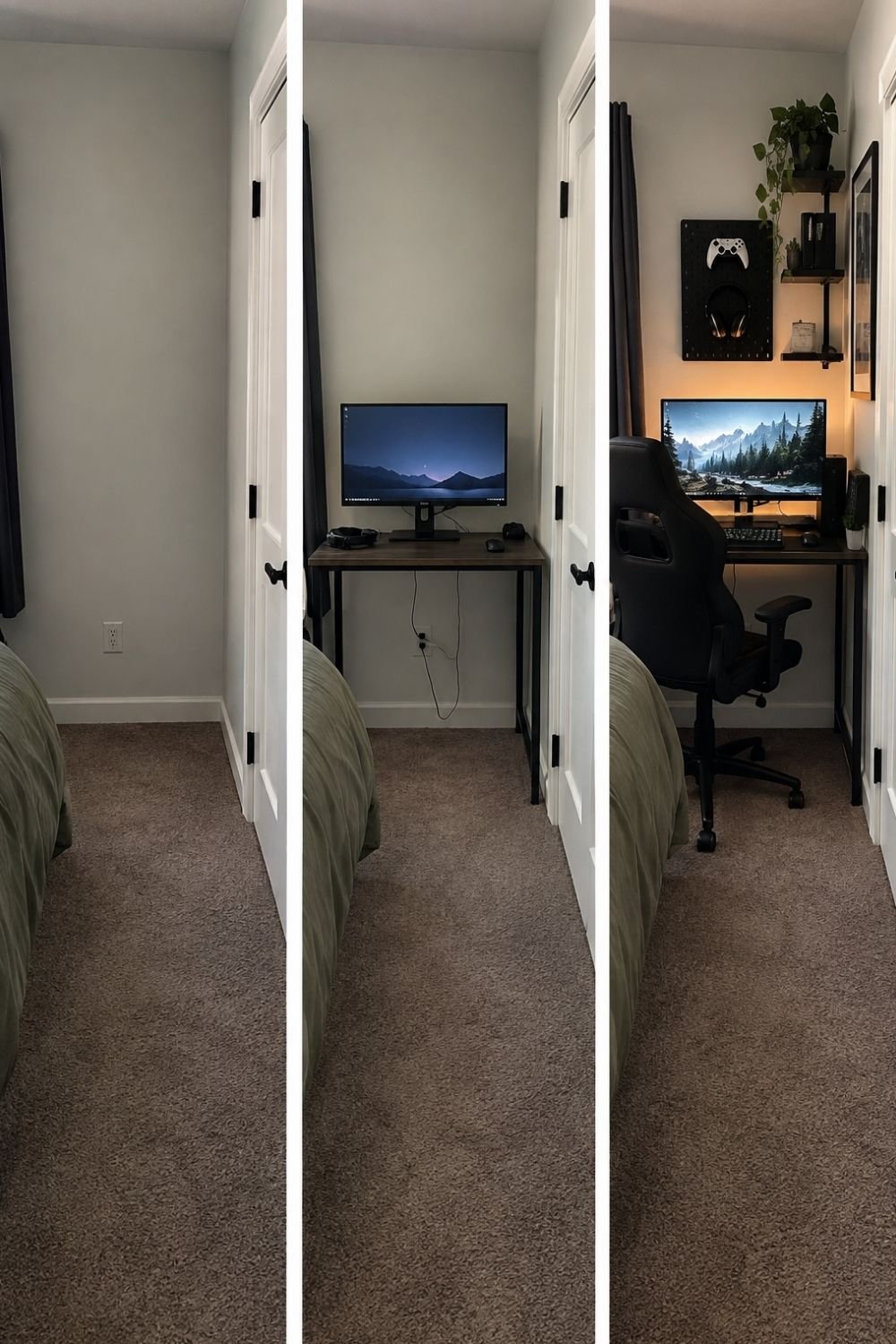
Photo by OurHoneyHome
The three frames above show exactly this kind of spot. First, it’s a narrow, empty strip of wall between the bed, a dark curtain and a closet door. In the second frame, a slim black-and-wood desk goes in with a single monitor, a headset and a controller. In the last, it’s a finished gaming corner: a black gaming chair, a black pegboard above the desk holding a controller and headphones, small black shelves with a trailing plant, a framed print on the side wall and a warm light glowing behind the monitor. It fits in a space most people would have written off.
The desk: shallow, sturdy, maybe in a corner
For a small room, the desk decides almost everything. A few things I’d look for:
- A slim, deep-enough top. 50–60 cm deep, not the 80 cm “gaming desks” often come in.
- Open legs, so the floor underneath stays visible and the room looks bigger.
- Drawers only if you need them. A small drawer unit under one side is handy; a full desk with drawers on both sides eats legroom.
- An L-shaped desk only if the corner is truly unused, since it takes up two walls.
- A black desk looks great with dark gear and hides scuffs. A light wood or white desk makes a small room look airier.
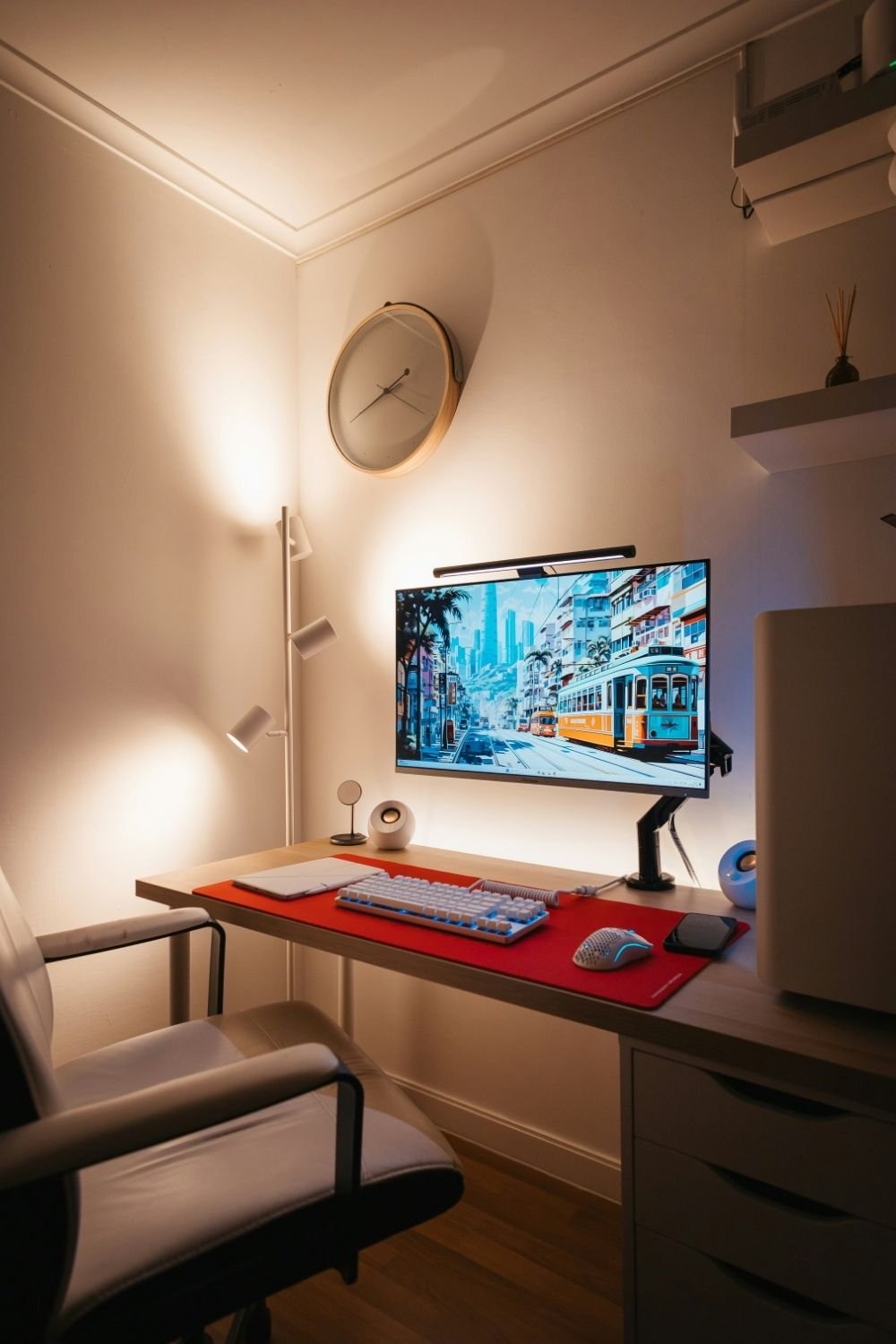
Photo by Nat Weerawong on Unsplash
This setup fits into a narrow alcove. A shallow wood desktop rests on a white drawer unit on one side and slim legs on the other. The monitor sits on an arm clamped to the back edge, which frees up the whole desktop, and a light bar across the top of the screen lights the keyboard without lighting the room. A red desk mat, a white keyboard and mouse, two small round speakers and a wireless charger are all there is. A floor lamp with three spotlights and a round wall clock fill the empty wall above, and the PC tower stands on the floor to the right.
One monitor, two, or stacked?
Dual monitor setups look great in photos, but side by side, two screens need a desk at least 140 cm wide. In a small bedroom, there are better ways to get more screen:
- Stack them. One monitor above the other takes the same width as a single screen.
- Go ultrawide. One curved ultrawide monitor replaces two screens without the gap in the middle.
- Use a monitor arm. It lifts the screen off the desk, frees up space underneath, and lets you push the screen back to the wall when you’re done.
- Use the TV for console gaming and keep the desk for the PC.
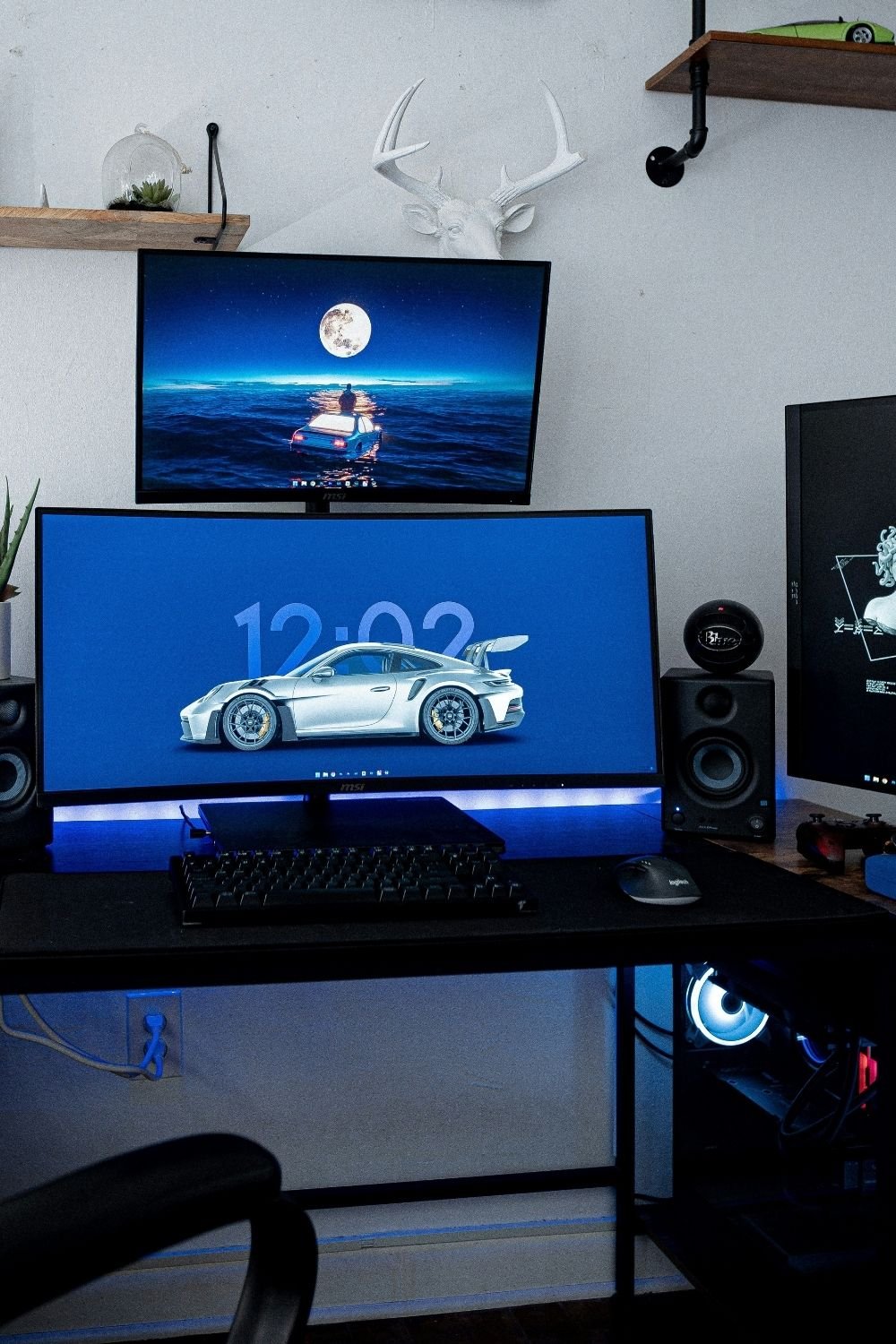
Photo by Andre Tan on Unsplash
Here, a curved ultrawide sits on a black desk with a second, flat monitor mounted right above it. Two bookshelf speakers flank the main screen, a blue LED strip glows under the monitor and behind the desk, and the PC sits underneath with its fans lit. A third screen stands off to the right. Above everything, there’s a white faux deer head, pipe shelves with a plant and a toy car, and a small terrarium on another shelf. Stacking keeps it to one desk width, even with this much screen.
Cable management that stays done
Nothing makes a small gaming setup look messier than cables. And in a bedroom, where the underside of the desk is visible from the bed, it matters even more.
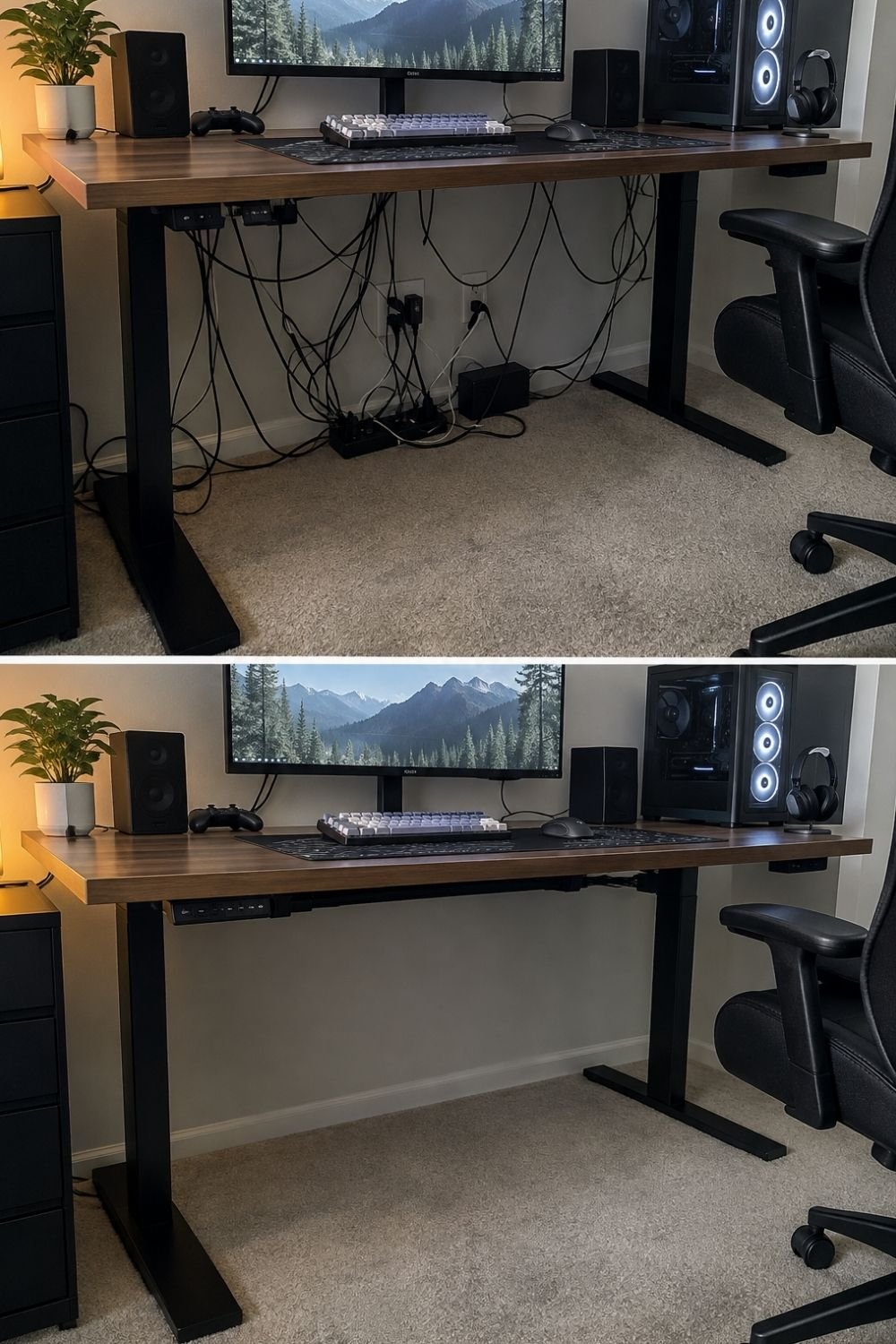
Photo by OurHoneyHome
The before-and-after above says it all. On top, a walnut standing desk with a monitor, speakers, a keyboard, a controller and a PC tower looks tidy from the front, but underneath is a nest of cables, two power strips on the floor and chargers dangling from the wall socket. On the bottom, it’s the same desk and the same gear, but every cable is gone from view. A power strip is mounted under the desktop and a cable tray runs along the back. The floor underneath is completely clear.
How to get there:
- Mount a power strip under the desk, near the back edge, so every plug goes up instead of down to the floor.
- Add a cable tray or basket under the back of the desk to hold the extra length.
- Bundle cables with reusable velcro ties, grouped by where they go.
- Run one single cable to the wall socket. Use a cable sleeve or a clip along the desk leg for that one.
- Go wireless where it makes sense: keyboard, mouse, headset and controller chargers can all sit on one small charging stand.
It takes an afternoon, and I’d put it ahead of any new accessory on the list.
Lighting: RGB, warm, or both?
This is where a gaming setup aesthetic is made or lost. My bias, up front: in a bedroom, I’d go easy on the RGB. A room that glows purple and blue all evening is hard to wind down in. Warm light behind the monitor, with a little color as an accent, looks calmer and is easier on the eyes.
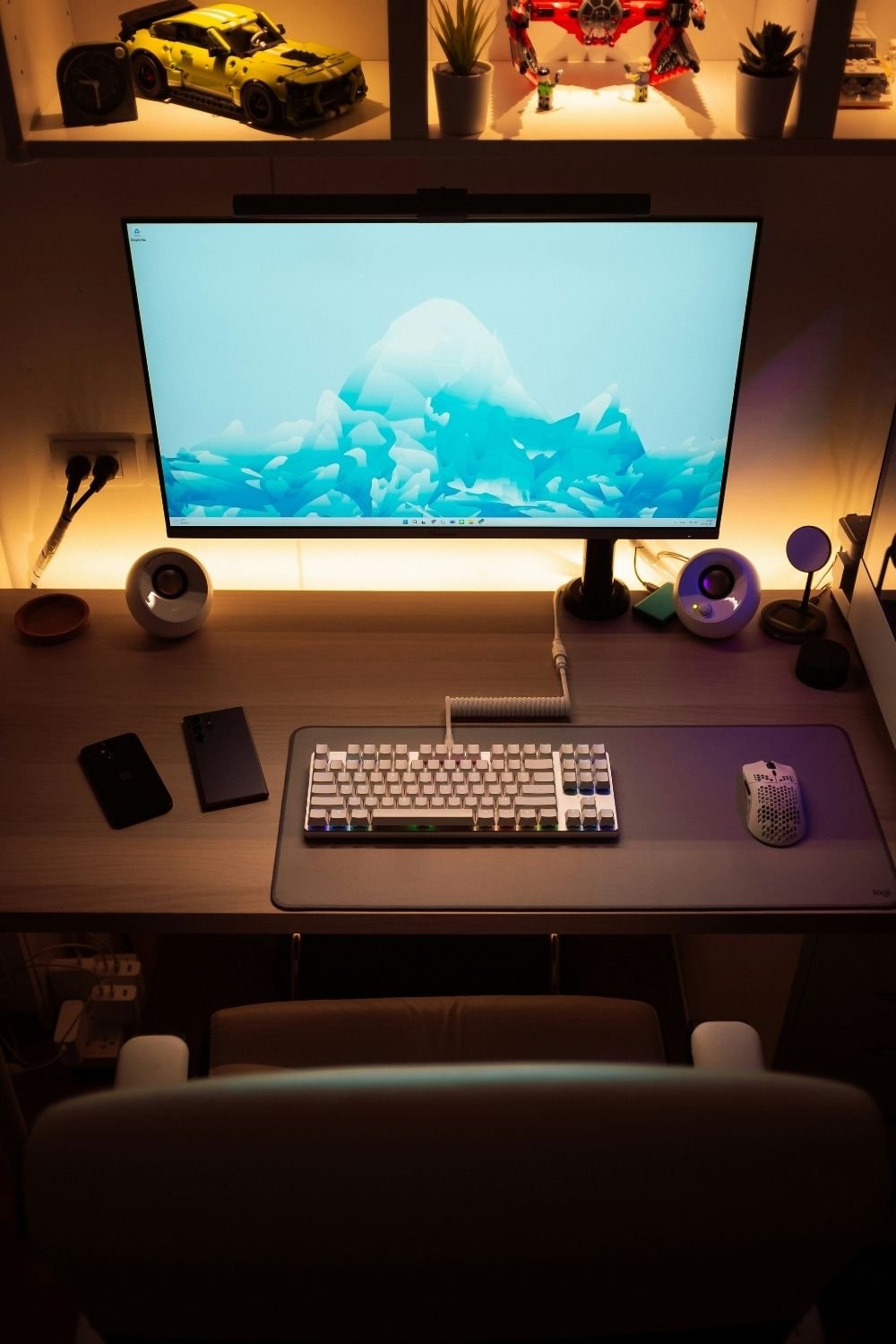
Photo by Nat Weerawong on Unsplash
This desk is the warm version. An LED strip behind the monitor washes the wall in amber, a light bar sits on top of the screen, and a lit shelf above holds a model car, a few plants and small collectibles. On the desk: a white keyboard with a coiled cable, a honeycomb mouse, a big gray desk mat, two round speakers and a wireless charger. It feels calm and still clearly a gaming desk.
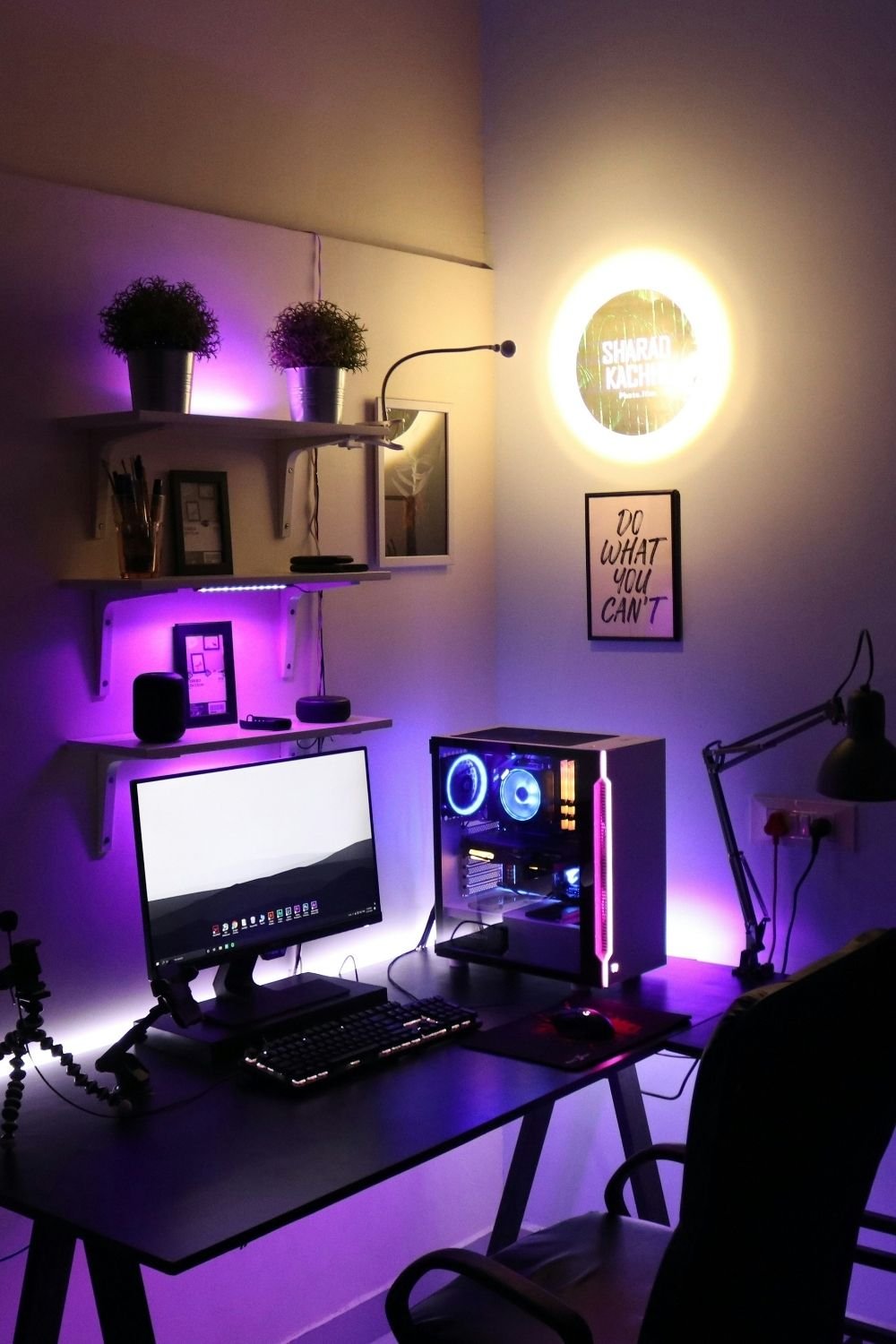
Photo by Sharad kachhi on Unsplash
And this is the colorful version. A PC gaming setup on a black trestle desk, with a glass-sided PC case full of blue fans and a pink light strip, purple LEDs under the desk and floating shelves, and potted plants on top. A round backlit sign and a framed quote print hang on the wall, and an adjustable desk lamp clamps to the edge. It works because the white walls and shelves keep it from turning into a dark cave, and because there’s still a plain desk lamp for when you want normal light.
What I’d do in a small bedroom:
- Light behind the monitor (a bias light or LED strip) cuts eye strain in a dark room.
- One warm lamp that’s not on the desk, for the rest of the room.
- RGB on a timer or a smart plug, so it can switch off at bedtime.
- Pick one or two colors for all the RGB, instead of letting every device do its own rainbow.
Chair and storage
If I had to pick one thing not to cut corners on, it would be the chair. You’ll sit in it for hours, and a bad one shows in your back long before it shows in the room. In a small space, it’s also the biggest thing after the bed.
- Office-style chairs are often slimmer and more comfortable than bulky racing-style gaming chairs.
- Armrests that flip up or tuck under let the chair slide fully under the desk.
- Light colors (white, gray) look less heavy than all-black chairs in a small room.
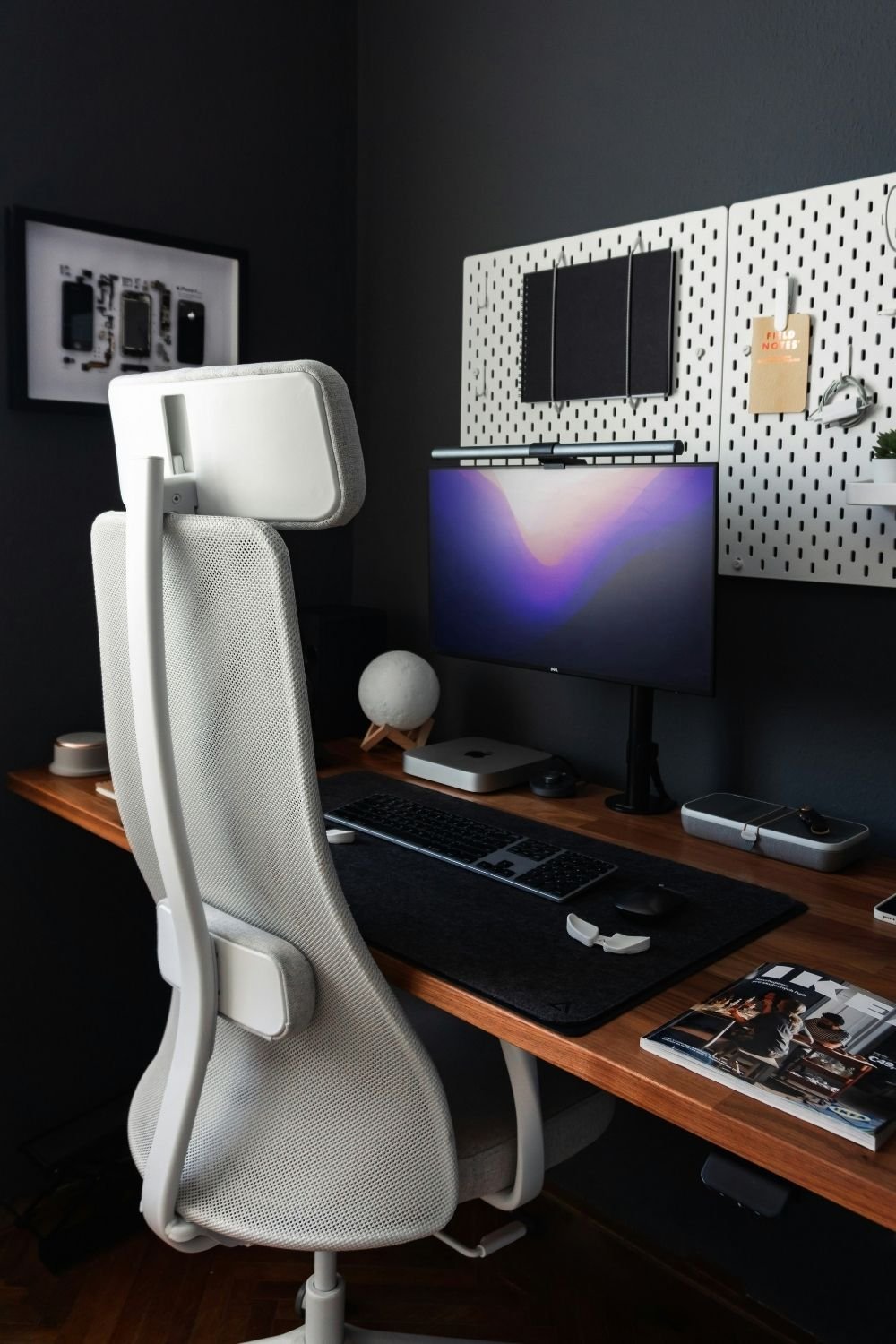
Photo by Matúš Gocman on Unsplash
This corner shows how to store things without adding furniture. Two white pegboards on a dark charcoal wall hold notebooks, a small shelf, a plant and cables, all off the desk. The monitor sits on an arm with a light bar on top, a small computer and a moon lamp share the solid wood desktop with a felt desk mat, and a white mesh office chair with a headrest keeps the look light. A framed, taken-apart phone on the side wall is a fun piece of tech wall decor.
Other storage ideas that don’t take floor space:
- Headphone hooks under the desk or on the side.
- Floating shelves above the monitor for games, collectibles and a plant.
- A monitor stand with a drawer for small things like cables and controllers.
- Under-bed storage for boxes, spare cables and anything that doesn’t need to be at the desk.
A console corner and display shelves
Not every setup needs a desk. If you mostly play on a console, a TV on a low unit with a comfortable seat can take less space than a full PC setup.
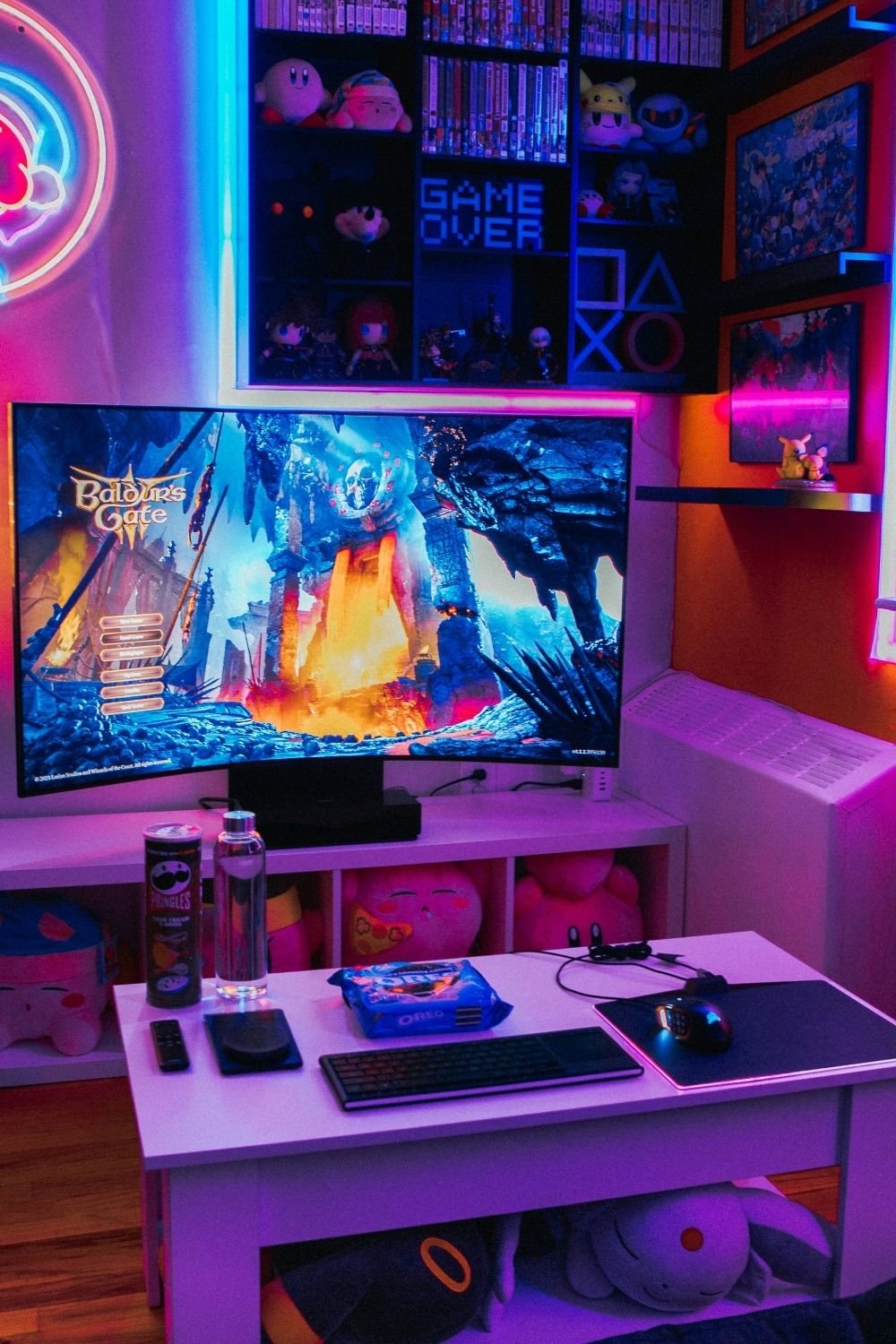
Photo by Branden Skeli on Unsplash
This one leans fully into the gamer room look. A curved monitor sits on a white cube unit filled with plush toys, and a low white table in front holds a keyboard, a lit mouse, a remote and snacks. Above, a black wall-mounted cabinet shows off rows of game cases, figures and a pixel-art “GAME OVER” sign, all edged in pink and blue neon light. A neon sign glows on one wall, and framed game art hangs on the other.
It’s a lot, but notice how it’s organized: the collection lives in one wall unit, not all over the room. That’s the trick for display shelves in a small bedroom. Keep the collection together in one cabinet or on one shelf wall, and the rest of the room can stay calm.
Pick a look
A few directions that work well in a small space:
- Black setup: black desk, black gear, a charcoal or black wall behind it. Sleek and it hides cables well. The black accent wall post shows how to keep a dark wall from shrinking the room.
- White setup: white desk, white keyboard and mouse, light wood. It makes a small room look larger, but shows cables and dust more.
- Minimalist: one monitor, one keyboard, one plant, nothing else on the desk. My personal favorite for a bedroom.
- Soft and warm: warm lights, wood, plants, a soft rug under the chair and a throw on the back of it.
- Retro or futuristic: pixel art, neon signs, a display shelf for older consoles, or chrome and cool LEDs. Best in small doses in a room you also sleep in.
If your setup also doubles as a work desk, the minimalist desk ideas post has more on keeping it calm and clear.
Keep it a bedroom, too
The last step is making sure the room still works for sleeping. A few ideas that help:
- Switch off everything with one button, with a smart plug or a power strip with a switch.
- A curtain or folding screen can hide the setup at night if it faces the bed.
- A rug under the chair protects the floor and softens the noise.
- A few acoustic panels or a fabric pinboard on the wall cut echo if you use voice chat.
- Keep snacks and drinks off the bed side. Give them a spot on a shelf or a small cart next to the desk.
For more ideas on making a small room work harder, the uni room post covers the same challenge with a student budget.
Buy now, upgrade later
You don’t need to build all of this at once. If I were setting up a small bedroom gaming corner from scratch, this is how I’d split it:
Buy now:
- A desk that fits (depth 50–60 cm)
- A comfortable chair
- A power strip mounted under the desk and a few cable ties
- One warm lamp or a light strip behind the monitor
Upgrade later:
- A monitor arm or a second, stacked screen
- A pegboard and floating shelves
- Smart plugs and RGB lighting
- Display shelves for the collection
Start with the parts you’ll feel every day: where you sit, how the desk fits, and whether you can see the floor under it. The glow can come later.
